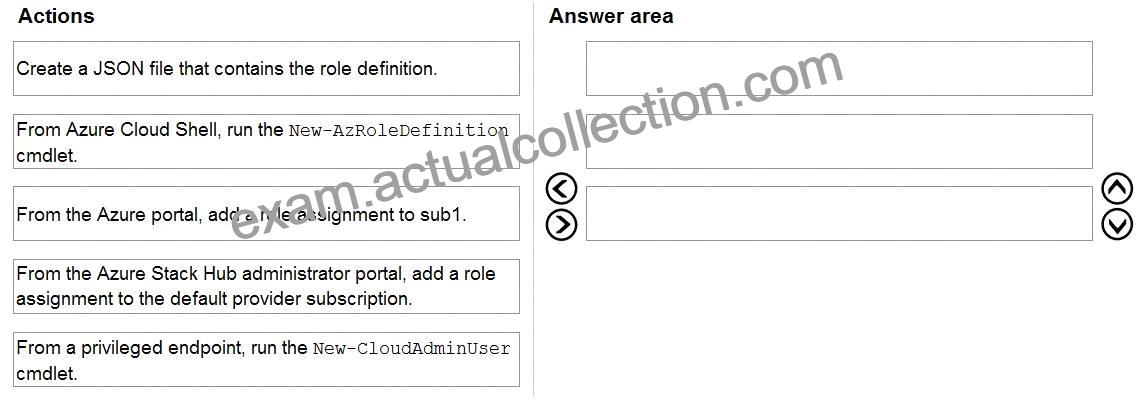
Q33. You have an Azure subscription named sub1 linked to an Azure Active Directory (Azure AD) tenant named contoso.com You have an Azure Stack Hub integrated system that is registered to sub1.
You need to delegate registering the Azure Stack Hub integrated system to an Azure Stack Hub operator. The solution must use the Principle of least privilege.
Which three actions should you perform in sequence? To answer, move the appropriate actions from the list of actions to the answer area and arrange them in correct order.
Explanation
Graphical user interface, text, application, email Description automatically generated
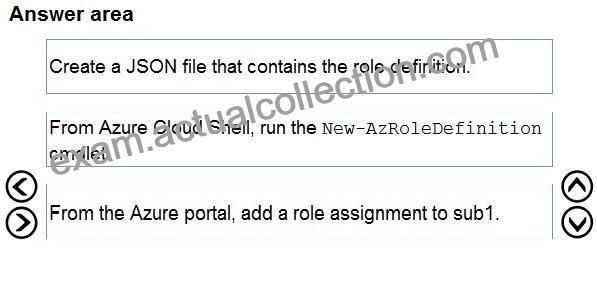
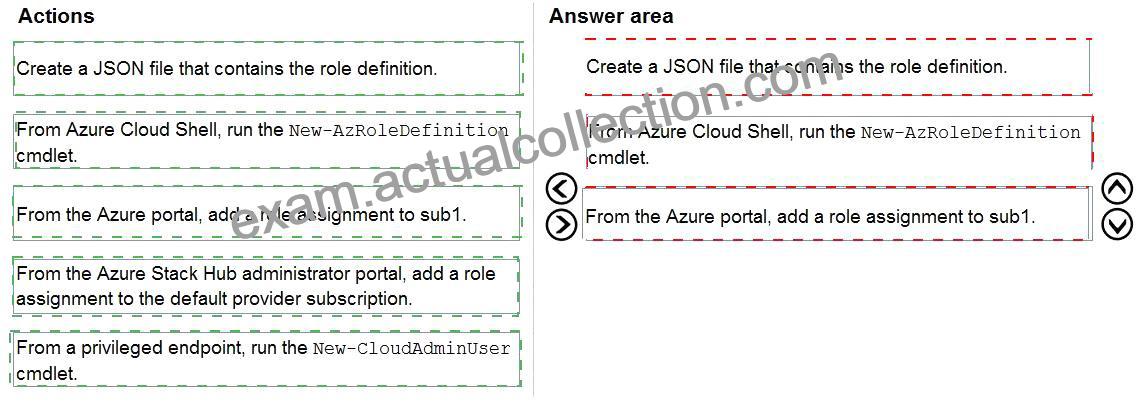
Step 1: Create a JSON file that contains the role definition.
Rather than using an account that has Owner permissions in the Azure subscription, you can create a custom role to assign permissions to a less-privileged user account. This account can then be used to register your Azure Stack Hub.
Create a custom role using PowerShell
Use the following JSON template to simplify creation of the custom role. The template creates a custom role that allows the required read and write access for Azure Stack Hub registration.
1. Create a JSON file. For example, C:\CustomRoles\registrationrole.json.
2. Add the following JSON to the file. Replace <SubscriptionID> with your Azure subscription ID.
{
“Name”: “Azure Stack Hub registration role”,
“Id”: null,
“IsCustom”: true,
“Description”: “Allows access to register Azure Stack Hub”,
“Actions”: [
“Microsoft.Resources/subscriptions/resourceGroups/write”,
“Microsoft.Resources/subscriptions/resourceGroups/read”,
“Microsoft.AzureStack/registrations/*”,
“Microsoft.AzureStack/register/action”,
“Microsoft.Authorization/roleAssignments/read”,
“Microsoft.Authorization/roleAssignments/write”,
“Microsoft.Authorization/roleAssignments/delete”,
“Microsoft.Authorization/permissions/read”,
“Microsoft.Authorization/locks/read”,
“Microsoft.Authorization/locks/write”
],
“NotActions”: [
],
“AssignableScopes”: [
“/subscriptions/<SubscriptionID>”
]
}
3. In PowerShell, connect to Azure to use Azure Resource Manager. When prompted, authenticate using an account with sufficient permissions such as Owner or User Access Administrator.
Connect-AzAccount
4. To create the custom role, use New-AzRoleDefinition specifying the JSON template file.
New-AzRoleDefinition -InputFile “C:\CustomRoles\registrationrole.json”
Step 2: From Azure Cloud shell, run the New-AzRoleDefinition cmdlet.
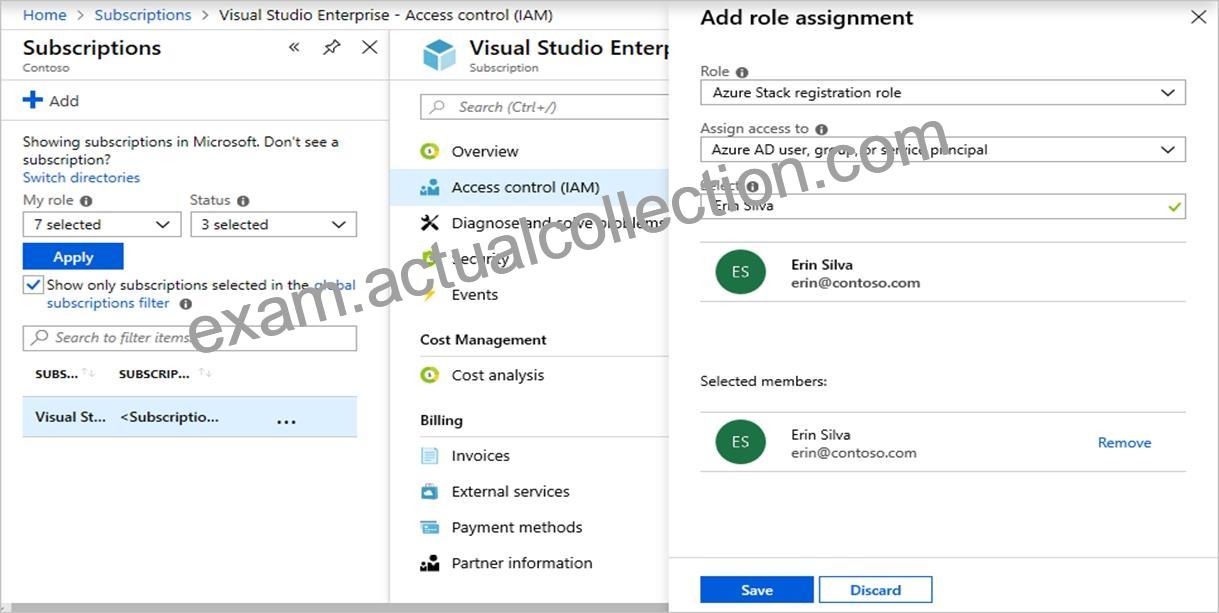
Step 3: From the Azure portal, add a role assignment to sub1.
Assign a user to registration role
After the registration custom role is created, assign the role to the user account that will be used for registering Azure Stack Hub.
Sign in with the account with sufficient permission on the Azure subscription to delegate rights – such as Owner or User Access Administrator.
In Subscriptions, select Access control (IAM) > Add role assignment.
In Role, choose the custom role you created: Azure Stack Hub registration role.
Select the users you want to assign to the role.
Select Save to assign the selected users to the role.
Reference: https://learn.microsoft.com/en-us/azure-stack/operator/azure-stack-registration-role