5/5 - (1 vote)

[2025] MD-102 Dumps are Available for Instant Access

Valid MD-102 Dumps for Helping Passing MD-102 Exam!

QUESTION 185
You have a Microsoft 365 subscription. The subscription contains computers that run Windows 11 and are enrolled in Microsoft Intune. You need to create a compliance policy that meets the following requirements:
* Requires BitLocker Drive Encryption (BitLocker) on each device
* Requires a minimum operating system version
Which setting of the compliance policy should you configure for each requirement? To answer, drag the appropriate settings to the correct requirements. Each setting may be used once, more than once, or not at all.
You may need to drag the split bar between panes or scroll to view content.
NOTE: Each correct selection is worth one point,

QUESTION 186
Hotspot Question
You have a Microsoft 365 subscription.
You plan to enroll devices in Microsoft Endpoint Manager that have the platforms and versions shown in the following table.
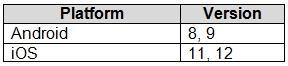
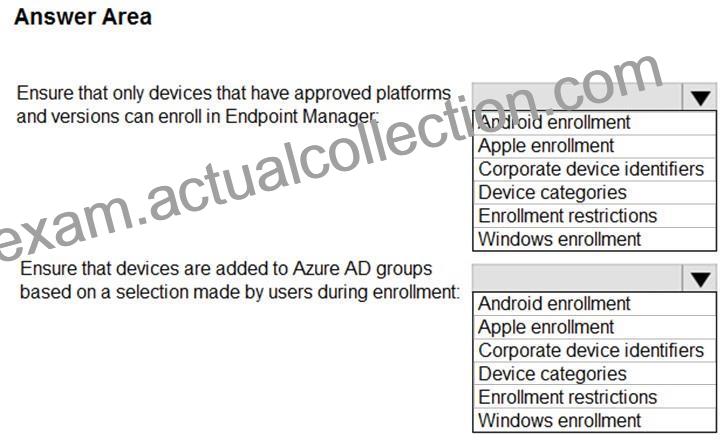
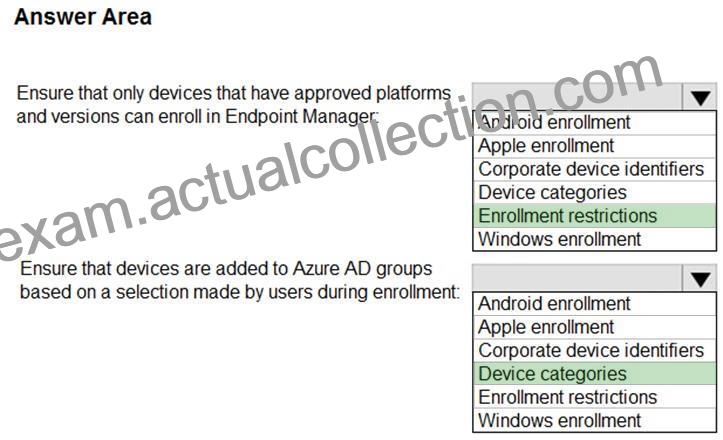
You need to configure device enrollment to meet the following requirements:
– Ensure that only devices that have approved platforms and versions
can enroll in Endpoint Manager.
– Ensure that devices are added to Microsoft Azure Active Directory
(Azure AD) groups based on a selection made by users during the
enrollment.
Which device enrollment setting should you configure for each requirement? To answer, select the appropriate options in the answer area.
NOTE: Each correct selection is worth one point.
QUESTION 187
You have a Microsoft 365 subscription.
Users have iOS devices that are not enrolled in Microsoft 365 Device Management.
You create an app protection policy for the Microsoft Outlook app as shown in the exhibit. (Click the Exhibit tab.)

You need to configure the policy to meet the following requirements:
* Prevent the users from using the Outlook app if the operating system version is less than 12.0.0.
* Require the users to use an alphanumeric passcode to access the Outlook app.
What should you configure in an app protection policy for each requirement? To answer, select the appropriate options in the answer area.
NOTE: Each correct selection is worth one point.

QUESTION 188
You have a Microsoft 365 subscription that contains the devices shown in the following table.

You plan to enroll the devices in Microsoft Intune.
How often will the compliance policy check-ins run after each device is enrolled in Intune? To answer, select the appropriate options in the answer area.
NOTE: Each correct selection is worth one point.

QUESTION 189
Your network contains an Active Directory domain. The domain contains a computer named Computer! that runs Windows 11. You need to enable the Windows Remote Management (WinRM) service on Computer1 and perform the following configurations:
* For the WinRM service, set Startup type to Automatic.
* Create a listener that accepts requests from any IP address.
* Enable a firewall exception for WS-Management communications.
Which PowerShell cmdlet should you use?


QUESTION 190
You have a Microsoft 365 E5 subscription that contains a group named Group1.
You create a Conditional Access policy named CAPolicy1 and assign CAPolicy1 to Group1.
You need to configure CAPolicy1 to require the members of Group1 to reauthenticate every eight hours when they connect to Microsoft Exchange Online.
What should you configure?


QUESTION 191
You have a Hyper-V host that contains the virtual machines shown in the following table.

On which virtual machines can you install Windows 11?


QUESTION 192
You have a Microsoft Intune subscription that has the following device compliance policy settings:
Mark devices with no compliance policy assigned as: Compliant
Compliance status validity period (days): 14
On January 1, you enroll Windows 10 devices in Intune as shown in the following table.

On January 4, you create the following two device compliance policies:
* Name: Policy1
* Platform: Windows 10 and later
* Require BitLocker: Require
* Mark device noncompliant: 5 days after noncompliance
* Scope (Tags): Tag1
* Name: Policy2
* Platform: Windows 10 and later
* Firewall: Require
* Mark device noncompliant: Immediately
* Scope (Tags): Tag2
On January 5, you assign Policy1 and Policy2 to Group1.
For each of the following statements, select Yes if the statement is true. Otherwise, select No.
NOTE:Each correct selection is worth one point.

QUESTION 193
You have a Microsoft 365 E5 subscription that uses Microsoft Intune. You have the Windows 11 devices shown in the following table.

You deploy the device compliance policy shown in the exhibit. (Click the Exhibit tab.)

For each of the following statements, select Yes if the statement is true. Otherwise, select No.
NOTE: Each correct selection is worth one point.

QUESTION 194
You have a Microsoft 365 subscription that includes Microsoft Intune. The subscription contains Windows 11 devices enrolled in Intune. The subscription contains three groups named Department Department2. and Department3.
You need to deploy Microsoft 365 Apps to the Windows 11 devices. The solution must meet the following requirements:
* Users in Department1 and Department2 must receive the full Microsoft 365 Apps suite, including Microsoft Project and Visio.
* Users in Department3 must receive the full Microsoft 365 Apps suite, including Microsoft Project, but without Visio.
* All other users must receive the full Microsoft 365 Apps suite without Microsoft Project or Visio.
What is the minimum number of deployments you should create?


QUESTION 195
You enable controlled folder access in audit mode for several computers that run Windows 10.
You need to review the events audited by controlled folder access.
Which Event Viewer log should you view?


QUESTION 196
Your company has a Microsoft 365 subscription.
The company uses Microsoft Intune to manage all devices. The company uses conditional access to restrict access to Microsoft 365 services for devices that do not comply with the company’s security policies.
You need to identify which devices will be prevented from accessing Microsoft 365 services.
What should you use?


QUESTION 197
For each of the following statements, select Yes if the statement is true. Otherwise, select No.
NOTE: Each correct selection is worth one point.

QUESTION 198
Your network contains an on-premises Active Directory domain named contoso.com that syncs to Azure AD.
A user named User! uses the domain-joined devices shown in the following table.

In the Microsoft Entra admin center, you assign a Windows 11 Enterprise E5 license to User1.
You need to identify what will occur when User1 next signs in to the devices.
What should you identify for each device? To answer, select the appropriate options in the answer area.
NOTE: Each correct selection is worth one point.

QUESTION 199
You have an Azure AD tenant and 100 Windows 10 devices that are Azure AD joined and managed by using Microsoft Intune.
You need to configure Microsoft Defender Firewall and Microsoft Defender Antivirus on the devices. The solution must minimize administrative effort.
Which two actions should you perform? Each correct answer presents part of the solution.
NOTE: Each correct selection is worth one point.


QUESTION 200
Your company uses Microsoft Intune to manage devices.
You need to ensure that only Android devices that use Android work profiles can enroll in intune.
Which two configurations should you perform in the device enrollment restrictions? Each correct answer presents part of the solution.
NOTE Each correct selection is worth one point.


QUESTION 201
You have a Microsoft 365 subscription that uses Microsoft Intune and contains the users shown in the following table.

You create a policy set named Set1 as shown in the exhibit. (Click the Exhibit tab.)

You enroll devices in Intune as shown in the following table.

For each of the following statements, select Yes if the statement is true. Otherwise, select No.
NOTE: Each correct selection is worth one point.

QUESTION 202
You have an Azure subscription.
You have an on-premises Windows 11 device named Device1.
You plan to monitor Device1 by using Azure Monitor.
You create a data collection rule (DCR) named DCR1 in the subscription.
To what should you associate DCR1?


QUESTION 203
You have a Microsoft 365 tenant that contains the devices shown in the following table.

You need to assign app protection settings to the devices.
What is the minimum number of app protection policies required?


QUESTION 204
You have 100 Windows 10 devices enrolled in Microsoft Intune.
You need to configure the devices to retrieve Windows updates from the internet and from other computers on a local network.
Which Delivery Optimization setting should you configure, and which type of Intune object should you create? To answer, select the appropriate options in the answer area.
NOTE: Each correct selection is worth one point.

QUESTION 205
Your network contains an Active Directory domain named contoso.com. The domain contains a computer named Computer1 that runs Windows 10. You have the groups shown in the following table.

Which groups can you add to Group4?


QUESTION 206
You have 100 devices that run Windows 10 and are joined to Microsoft Azure Active Directory (Azure AD).
You need to prevent users from joining their home computer to Azure AD.
What should you do?


QUESTION 207
Your network contains an Active Directory domain. The domain contains computers that run Windows 8.1 and the users shown in the following table.

You plan to use the Microsoft Assessment and Planning (MAP) Toolkit to collect inventory data.
The MAP Toolkit has the following configurations:
– Inventory scenario: Windows computers
– Discovery method: Use Active Directory Domain Services (AD DS)
You need to identify which user to use for the MAP Toolkit inventory discovery. The solution must use principle of least privilege.
What should you identify?


QUESTION 208
You have a Microsoft 365 subscription that uses Microsoft Intune and contains the users shown in the following table.

You create a policy set named Set1 as shown in the exhibit. (Click the Exhibit tab.) You enroll devices in Intune as shown in the following table.

For each of the following statements, select Yes if the statement is true. Otherwise, select No.
NOTE: Each correct selection is worth one point.


Updated MD-102 Dumps Questions For Microsoft Exam: https://www.actualcollection.com/MD-102-exam-questions.html

Related Links: www.stes.tyc.edu.tw myportal.utt.edu.tt myportal.utt.edu.tt myportal.utt.edu.tt myportal.utt.edu.tt www.stes.tyc.edu.tw